Photoshop's new Selection Brush Tool
Photoshop has introduced a new Selection Brush Tool that simplifies the selection process. This tool combines brush and lasso functionalities, allowing users to create precise selections with ease.
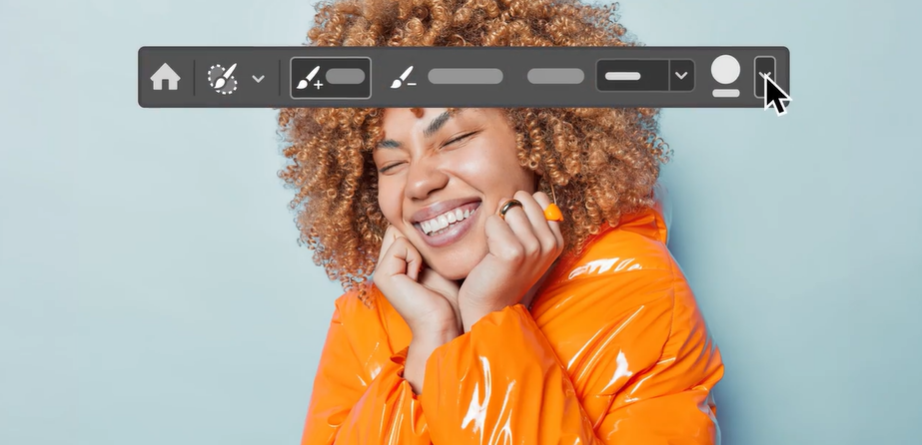
The latest Photoshop update introduces the Selection Brush Tool, which integrates brush and lasso gestures for efficient selections. This tool offers the ability to add or remove areas from the selection and adjust brush hardness and opacity, facilitating selections with varied opacity and softer, feathered edges.
By brushing or circling around a desired area on the canvas, selections can be made more quickly, eliminating the need for Quick Mask Mode or the Brush tool within the Select and Mask workspace.
The Selection Brush Tool functions similarly to other selection tools in Adobe Photoshop. However, it provides a colored overlay for the selected area, with "marching ants" visible only when switching to another tool. Users can customize the overlay color via the Colors dropdown in the gear icon for improved visualization and adjustment.
video:adobe.com
The Selection Brush Tool is located within the Lasso tool group in the toolbar.

A lasso-shaped overlay appears on the canvas when the Selection Brush Tool is used. To visualize the selection boundary with "marching ants," a different tool may be selected. The overlay color can be modified from the Color dropdown within the options bar.

Brush hardness and opacity are adjustable.

The selection can be refined by toggling between the Add and Subtract brushes.
衣装を通販で探すときは、商品画像だけでなく実寸とセット内容も確認しておくと安心です。商品仕様や選び方を比べたい場合は、初音ミク コスプレ衣装 通販から関連情報を確認できます。注文前に使用日と発送予定を照らし合わせ、試着や調整に使える時間も確保しておくと安心です。